Use case
Collect permission slips and enrolment forms
How education work with Docustay.
The old way
- Paper in backpacks
- Forms that never come back
- Hand-entered lists
With Docustay
- A link by email or message
- Reminders for the ones outstanding
- A sheet of who has signed
Start from a template
Three tips
- 1
Use one public link per class or event.
- 2
Add a guardian role for students under the age of majority.
- 3
Download the report of who has signed.
What to watch for
Rules about student records differ by country and school. Keep only what you need and for as long as you need it.
This is general information about how signing works, not legal advice. Rules differ by place and by document; if a document matters a great deal, ask someone qualified where you are.
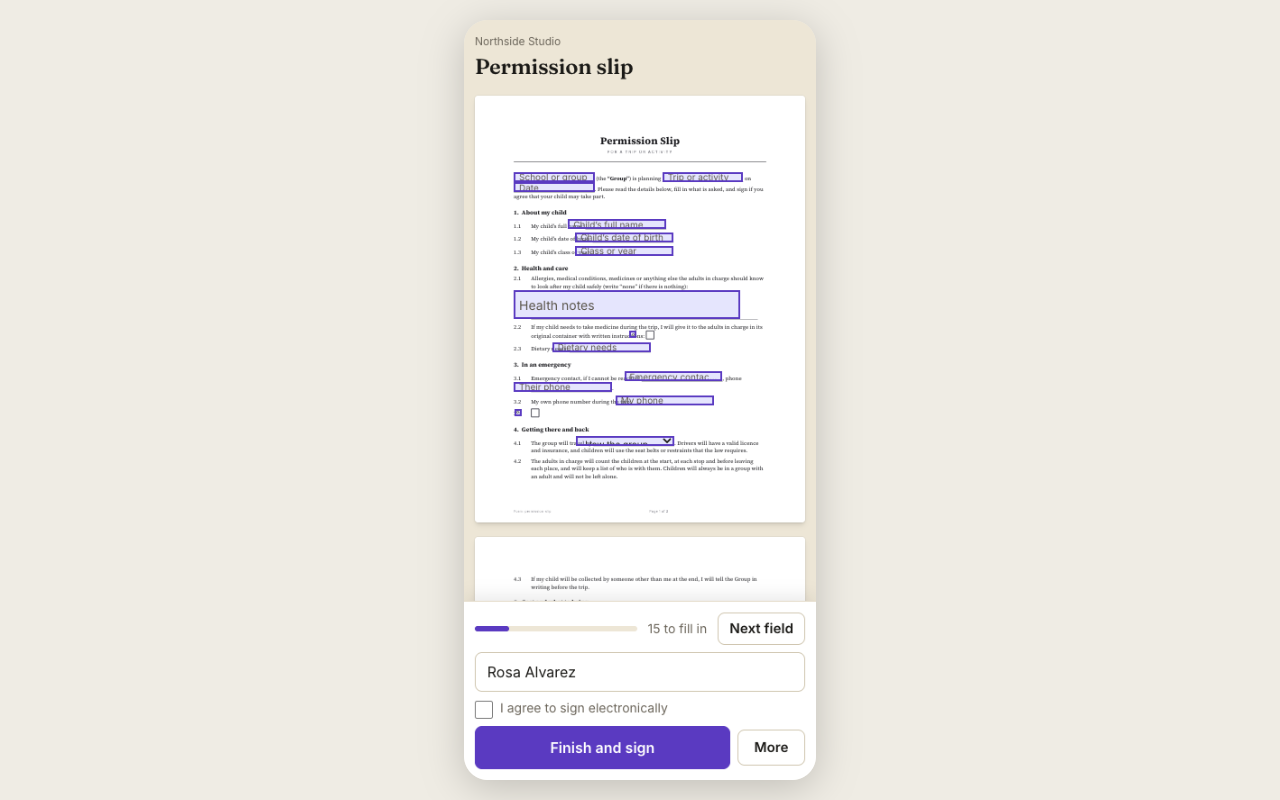
A worked example
A school club needs permission slips for a field trip. The teacher sends a public link in the class message. Each parent opens it on their phone, picks their child's name, signs and adds an emergency phone number. The teacher has a list of who has signed and sends a reminder to the rest with one press.
What to set up once
Use the Permission slip template. Add the trip date and destination as fields. Reuse the template for the next trip by changing two lines.
Collecting payment
If the trip costs money, add a payment field and collect it in the same step. The money goes to your Stripe account.
What to check before sending
Put each guardian or student in their own seat, make the permission checkboxes required, and set a due date so reminders go out before a deadline. A public link lets everyone start their own copy without you sending each one.
After it is signed
Everyone who signed gets the sealed copy by email, and you can find any signed form later from the document list by title or date. A signer who made a mistake can be given a fresh copy of the form without starting over for everyone else.
Questions people ask
Can parents sign without an account?
Yes.
Can I see who has not signed?
Yes, the document list shows each person's status.
Can I send one link to the whole class?
Yes, a public link lets each parent start their own copy.
Keep reading
Send your first one
Create a workspace, upload a document and send it. No card needed.