Product
Write the fields into the file
Write the fields into the file. Docustay finds them and places them for you.
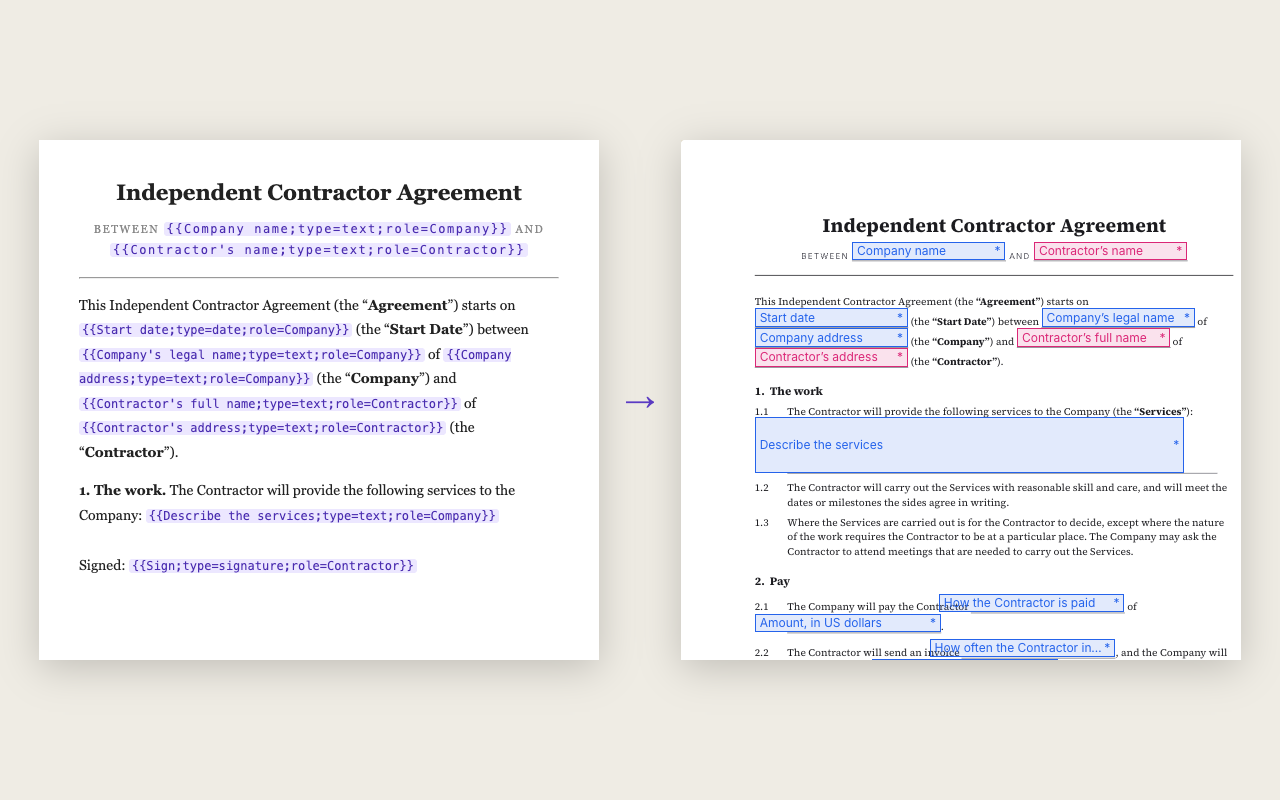
The tag, and the eleven types
{{Label;type=signature;role=Tenant}} — a label, then settings separated by semicolons: type, role, and more.
| type | What it makes |
|---|---|
signature | A signature box for the role |
initials | A small box for initials |
date_signed | The date, filled in when the person signs |
text | A line of text, optionally limited to a number, email, phone or date |
checkbox | A tick box |
dropdown | One choice from a list |
multiselect | Several choices from a list |
image | A picture the person adds |
file | A file the person uploads |
stamp | A stamp image, such as a company seal |
payment | An amount collected through Stripe |
A worked example
Here is a line in a Word file: Client signature {{Client signature;type=signature;role=Client}}. Upload the file and Docustay finds the tag, puts a signature box where it was, assigns it to the Client seat and removes the tag text from the page. The same file with six tags becomes a document with six fields.
A tag has a name, then settings separated by semicolons. Common settings are type (signature, text, date, checkbox, dropdown and others), role (who fills it in), label, and required.
Why teams use tags
If your contracts are produced by software, tags let that software say where the fields go. No one opens an editor and drags boxes. It also makes documents easy to review: the field is written in the text where a person can see it.
When tags and when the editor
Use the editor for a one-off. Use tags when documents are generated, when the same layout repeats, or when you want the fields to live in version control next to the text.
Writing tags in a template you reuse
Tags work well in a template that is filled in by software. The file keeps its tags, each send fills the names and dates it knows, and the signer sees finished fields. A change to the wording is a change to one file, so the whole team sends the same version.
Questions people ask
What happens if a tag has a mistake?
Docustay tells you which tag and what is wrong, in plain words, before anything is sent.
Do tags work in PDF files too?
Yes, as long as the tag is real text in the PDF, not a picture of text.
Can a tag take a payment?
Yes. A payment tag can be a fixed amount, a value typed by the signer, a formula over other fields, a Stripe price or a Stripe payment link.
Keep reading
Start free
Create a workspace, upload a document and send it. No card needed.